
Dolphin Show 6 Aqua Fun
Reviews
Description
Game Introduction
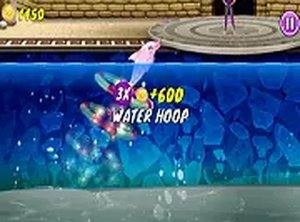
Dolphin Show 6 Aqua Fun is a free online arcade game where you guide a playful dolphin through a lively aquarium. The core objective is to perform spectacular jumps and spins to entertain the audience and earn stars. Each level introduces new challenges that encourage you to refine your timing and coordination. The game features bright colors, cheerful music, and intuitive controls, making it accessible for players of all ages. No downloads are required, and it runs smoothly on both desktop and mobile browsers, so you can play anytime. This wholesome experience focuses on practice and patience, delivering a relaxing pastime for anyone seeking lighthearted fun.
How to Play
Playing Dolphin Show 6 Aqua Fun is straightforward. Use your mouse or tap the screen to guide the dolphin as it leaps out of the water. Time your clicks carefully to perform flips and catch fish for bonus points. Each level requires you to complete a set of maneuvers to progress. Clear on-screen prompts show you what to do next, keeping the experience simple and engaging. As you advance, challenges become more exciting, but the controls remain easy to master. You can also switch to full-screen mode for a more immersive view. Collect stars and avoid obstacles to achieve the highest score. Practice and timing are key, making this a great way to improve hand-eye coordination while having fun.
Game Features
Bright and colorful graphics that appeal to all ages. Easy one-click controls that are simple to learn. Family-friendly content suitable for children and adults. No download needed, works directly in the browser. Full-screen mode available for a more engaging experience.
Tips for Success
Focus on timing your clicks precisely to maximize maneuver scores. Practice each level multiple times to learn the best moments for jumps and flips. Collect fish for bonus points whenever possible, as they can boost your final score. Stay patient and avoid rushing; careful coordination leads to better results. Use full-screen mode to minimize distractions and improve your focus. Regular practice will help you master the controls and achieve higher star ratings.








Player Comments
Sign in to comment
You must be logged in before posting a review or rating.
No account? Create one
No comments yet. Be the first to comment!